
Browser Mode
Open IRIS iPad in your desktop or mobile browser. Choose the device that suits the way you want to work—not just an iPad.
Discover IRIS iPad POS: a distinct point-of-sale experience with its own interface and functionality, created for flower shops that want to work on iPad.
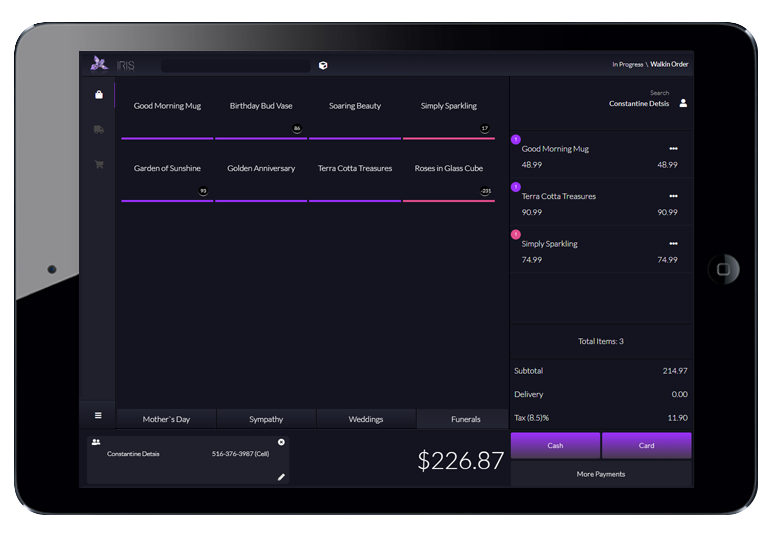
Beautifully designed. Flexible by nature.
Enjoy the polished, modern design you expect from IRIS, with a fresh interface that brings a new perspective to florist point of sale. It’s a distinct experience with your flower shop at its heart.
And despite its name, IRIS iPad isn’t limited to iPads. Access it across iPad, desktop and laptop devices through desktop or mobile browsers, with Windows and Mac compatibility.
Already using IRIS desktop software? You can access IRIS iPad directly from your main desktop software, too.
Explore the desktop IRIS POS
Open IRIS iPad in your desktop or mobile browser. Choose the device that suits the way you want to work—not just an iPad.
Prefer an app-like experience? Choose App Mode for that native-style feel while working with IRIS iPad.
Select an image to explore the full screen.

Give your team flexibility during a sale—and your business the controls to guide it. IRIS iPad pairs item-level adjustments with detailed backend product settings for your IRIS desktop software and iPad.
Edit the price of a specific item at any point during a sale, adjust quantities, change taxable status and apply inline product discounts. Even update an individual product’s description during the order to reflect your customer’s request.
The IRIS backend product management system lets you configure the items used by your IRIS desktop software and iPad, down to the details that matter to your shop.
Specify price thresholds to help keep sales pricing and your team within the boundaries you define. Put clear product-pricing guidelines in place while giving your staff the flexibility to serve customers.
Create automatic discounts or mark-ups for individual products on specific dates or across date ranges. Plan time-based pricing for seasonal occasions ahead of time instead of relying on ad-hoc adjustments at the register.
Designate whether a product’s price or description is editable, set its taxable status and configure other product options in the backend. Shape the product controls around the way you want your flower shop to operate.
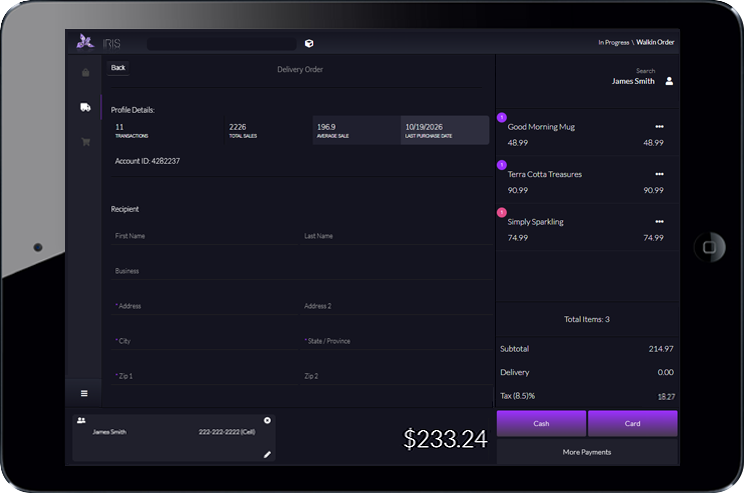
Bring clarity and confidence to every delivery and pick-up order. From recipient details to customer insights and printed paperwork, IRIS iPad helps you keep the moving parts of an order together.
Enter recipient information, delivery or pick-up dates, card messages and special instructions—giving your team the details they need to prepare each order.
Find a customer and view their total transactions, total sales, average sale amount and last purchase date. Use that context to make more informed suggestions while their current order is underway, bringing a more professional, personal touch to the conversation.
Search a customer’s past recipients and your delivery hot-spots, including hospitals, funeral homes and other popular locations. Bring frequently needed information within reach while you enter the order.
Print receipts, delivery/super tickets, pick-up tickets, designer worksheets, enclosure cards and invoices to printers throughout your shop. Running a multi-store floral business? Print to other locations, too.
IRIS offers numerous customization options so you can tailor your iPad experience to your flower shop.
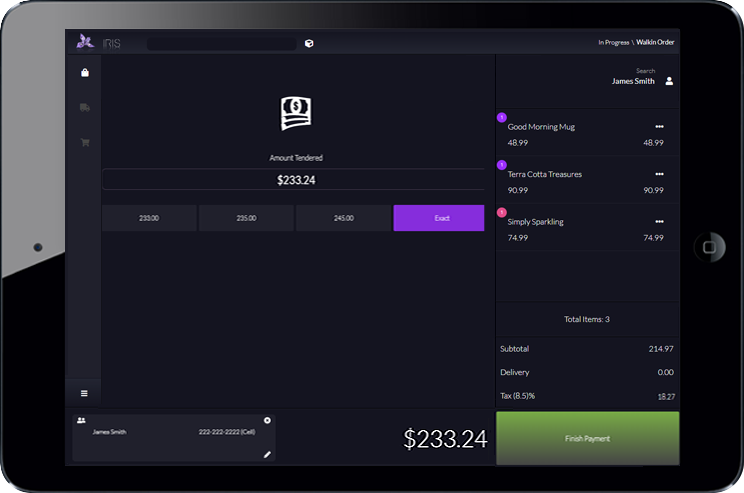
Keep checkout moving with flexible payment options and settings that suit your store. Once the order is entered, IRIS iPad brings you from order details to completed checkout in just a few clicks.
After entering the order information, complete checkout in a few clicks and send your customer on their way. Give the final step of the sale the same attention as the flowers they’ve chosen.
Accept cash, credit cards and more. Just as in the desktop version of IRIS, you choose which payment methods you want to accept in your flower shop.
Securely enter credit card numbers during a phone order, or swipe a card for an in-person transaction. IRIS is certified compliant with its integrated payment partners.
Set the cash denominations you want to use for cash sales, tailoring the available cash options to the way your team works.
Choose how many copies of a receipt are printed and which payment methods open the cash drawer. Shape these checkout settings around your store’s day-to-day workflow.
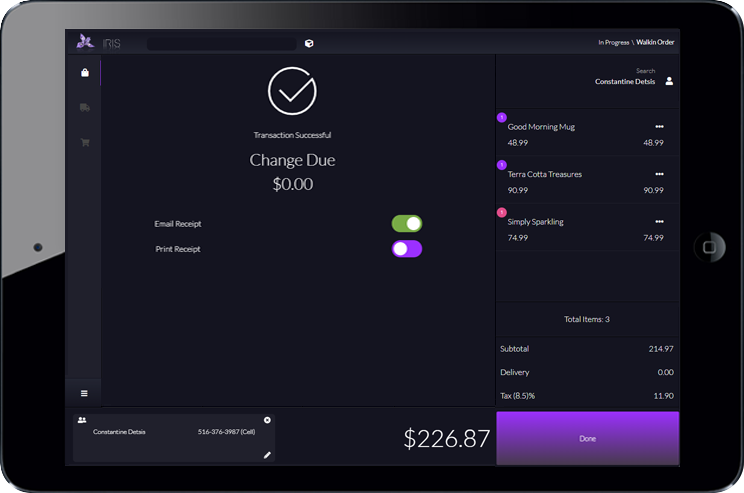
Finish each sale with the receipt your customer prefers and the document options your team needs. IRIS iPad brings desktop-style customization to those final checkout details, so the handoff fits your flower shop.
Once the sale is complete, select how your customer would like to receive their receipt. Offer a printed copy or email it, letting them choose the format that works for them.
Use your IRIS backend parameters to choose which additional document-printing options appear at sales completion. Tailor the choices your team sees to the way your store handles its orders.
Display the option to print an invoice for a house account order, a delivery/super-ticket for a delivery, or a pick-up ticket for a pick-up order.
Make designer worksheets and enclosure cards available as additional print options, keeping the paperwork your team needs within reach after the sale.
The customizable power you know from IRIS desktop software is available in IRIS iPad software, too. Shape these completion choices in your backend and give your team a finish that fits your shop’s workflow.
Tell us about your business. We’ll help you explore IRIS iPad POS and the options for your flower shop.