Scan the stack.
Update in one go.
Holiday rush? Keep your orders moving without opening each one individually.
Scan the barcodes on your printed order documents, choose a status and save. Mark a batch “Out for Delivery,” “In-design,” or any status you’ve created for your flower shop—then update it again whenever your workflow changes.
More about status scanning
The new module uses the unique order barcodes on your printed delivery/super-tickets, pick-up orders, invoices, designer worksheets and other order documents.
Have 10, 20, 50 or more orders ready for the next stage? Scan them, select the status from your shop’s custom list and save to update the whole batch together.
Your traditional IRIS Order Manager method is still available for individual updates. Choose the approach that suits the moment, and change statuses again whenever you need to.
IRIS supports any barcode scanner on the market, so the new scanning workflow can sit alongside the way you already manage orders.
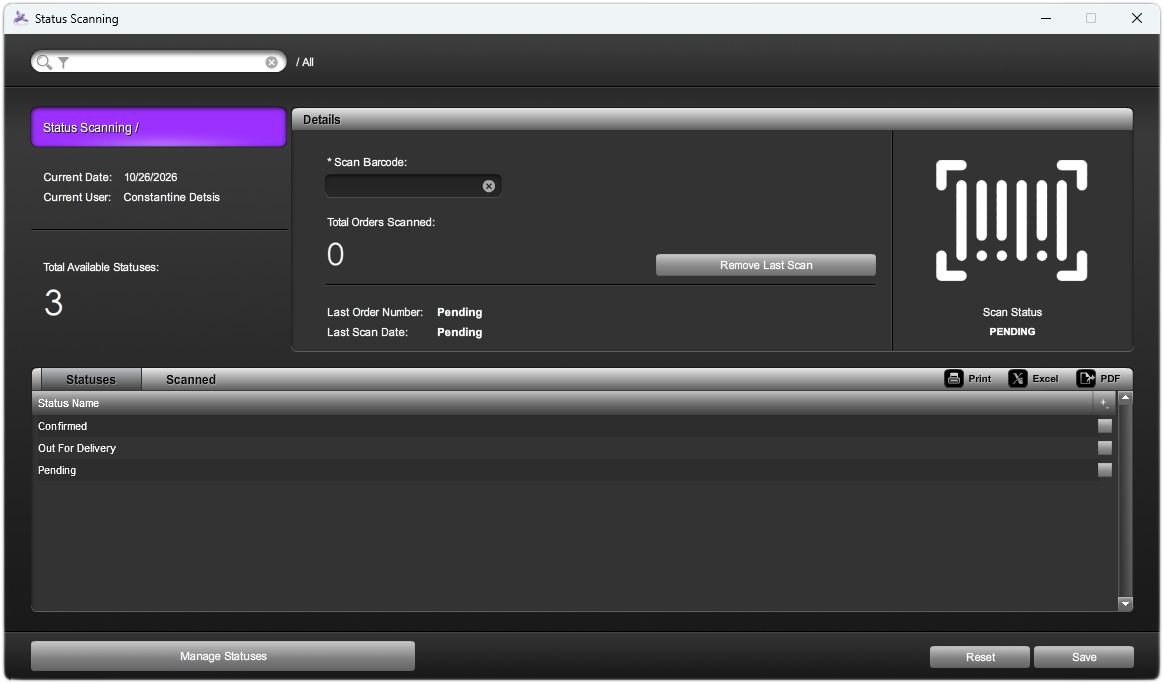
Scan your orders.
Scan the unique barcodes on your printed order documents.
Choose your status.
Select the next stage from the statuses you’ve created.
Save the batch.
Apply the selected status to all the scanned orders together.