Coming November 10Meet IRIS Halo.Talk to IRIS. Keep creating.
Made for florists. Not just retail.

Your flower shop has its own rhythm. Your POS should, too.

Take orders, manage customers, and keep your day running smoothly. A point of sale that understands the way florists work.

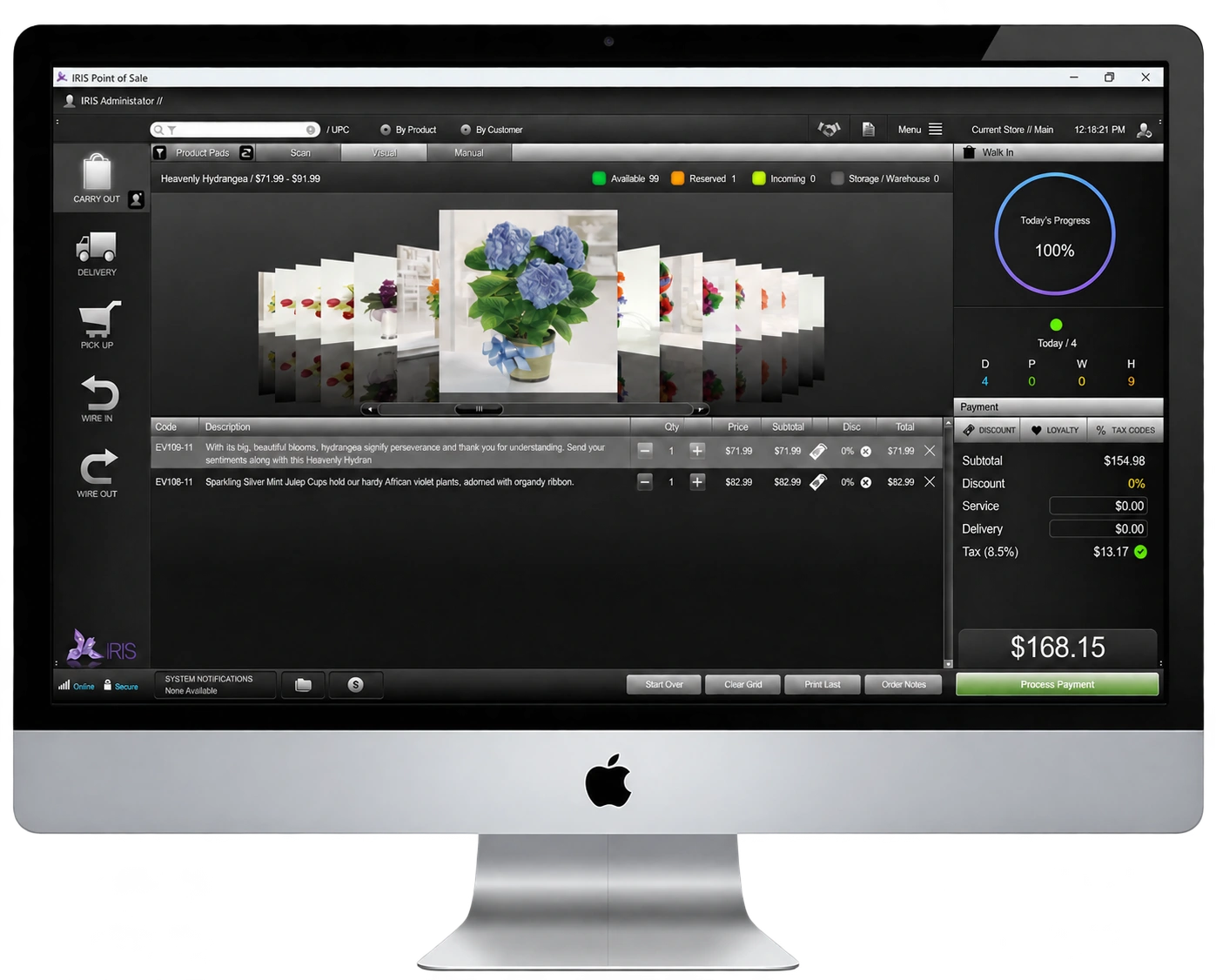
IRIS florist POS Visual Mode with arrangement photos and daily progress displayed on a Mac
MADE FOR YOUR EVERYDAY

Less busywork.
More possibilities.

From a quick walk-in bouquet to a delivery with a handwritten card, IRIS keeps the details together. Personalize your Product Pads, connect customer history to each order, and work in the way that feels natural to your shop.

  • Delivery, walk-in, pickup, and wire orders
  • Customizable Product Pads and touch-friendly checkout
  • Customer history, house accounts, and flexible payments
  • Offline mode for core POS tasks when your connection drops
IRIS FOR iPAD · MADE FOR FLORISTS

Your POS.
Your iPad.

A different interface. The same florist focus.

IRIS POS for iPad has its own unique design and functionality—not a desktop interface squeezed onto a tablet. Discover a distinct point-of-sale experience created for flower shops that want to work with IRIS on iPad.

Its own designIts own functionality
Explore IRIS for iPad
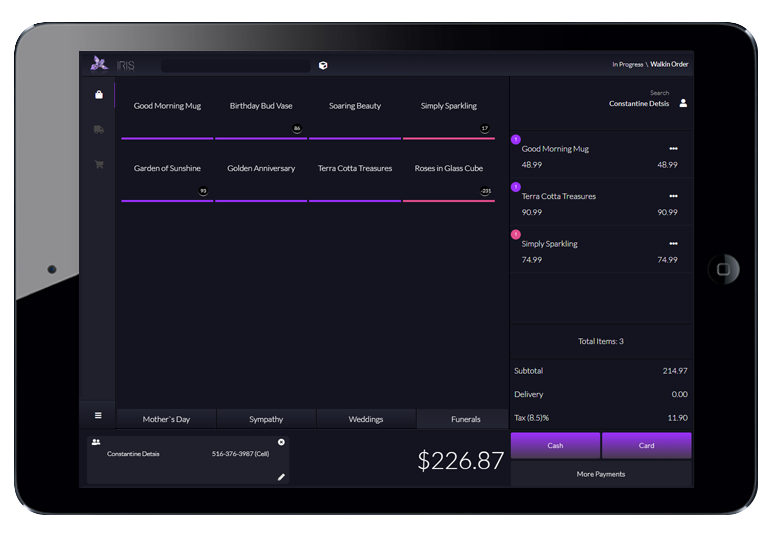
IRIS florist POS on iPad showing product selection, order totals and payment options
Designed for iPad. Focused on florists.
YOUR FULLY CUSTOMIZABLE FLORAL POS01 / ORDER ENTRY YOUR WAY

Your Fully Customizable Floral POS

Introducing IRIS Product Pads. Order Entry Your Way.

IRIS allows you to customize the layout of your product screen for the fastest checkout ever. Enter orders with NO scrolling. Touch screen compatible.

START YOUR FREE TRIAL
Florist POS Product Pads
IRIS Product Pads
  • Create your own product pads for holidays, occasions or any category.
  • Control where your buttons are positioned on the screen.
  • Change button colors & names.
  • Display real time inventory counts on each product button.
  • Add discounts by line item, customer, recipient or to the entire order.
  • Accept any payment method including split payments.
  • Multi-order capable. Enter multiple deliveries or pick-ups at one time on one transaction.
  • IRIS supports multi-stores. Transfer orders, deliveries and stock.
  • Supports barcode scanning & image lookups.
  • Manage user accounts and permissions.
  • Track house accounts & outstanding balances.
  • Take payments on account with our integrated billing center.
  • Works on Windows & MAC.
  • Perfect for touch screen computers.
  • Works with NO Internet connection.
  • Powerful data importing. Import customers, products, hot spots, delivery charges & more from another floral POS.
IRIS PRODUCT PADS02 / TAP. RING. CHA-CHING.
Floral POS Product Pad Buttons

IRIS Product Pads. Order Done.

IRIS Product pads are also great if you sell more than just flowers. Add items to a sale in just seconds.

( Tap. Ring. Cha-ching. )

We Understand That Each Flower Shop Is Unique.

That's why IRIS floral POS allows you to customize how your florist POS works. Design your own product entry layout. Customize your tax and delivery charges for delivery orders. Enable things like "Smart Fields" that get you through order entry without even having to click the "TAB" key.

PRODUCT PAD MANAGER

Your product screen.
Designed for your shop.

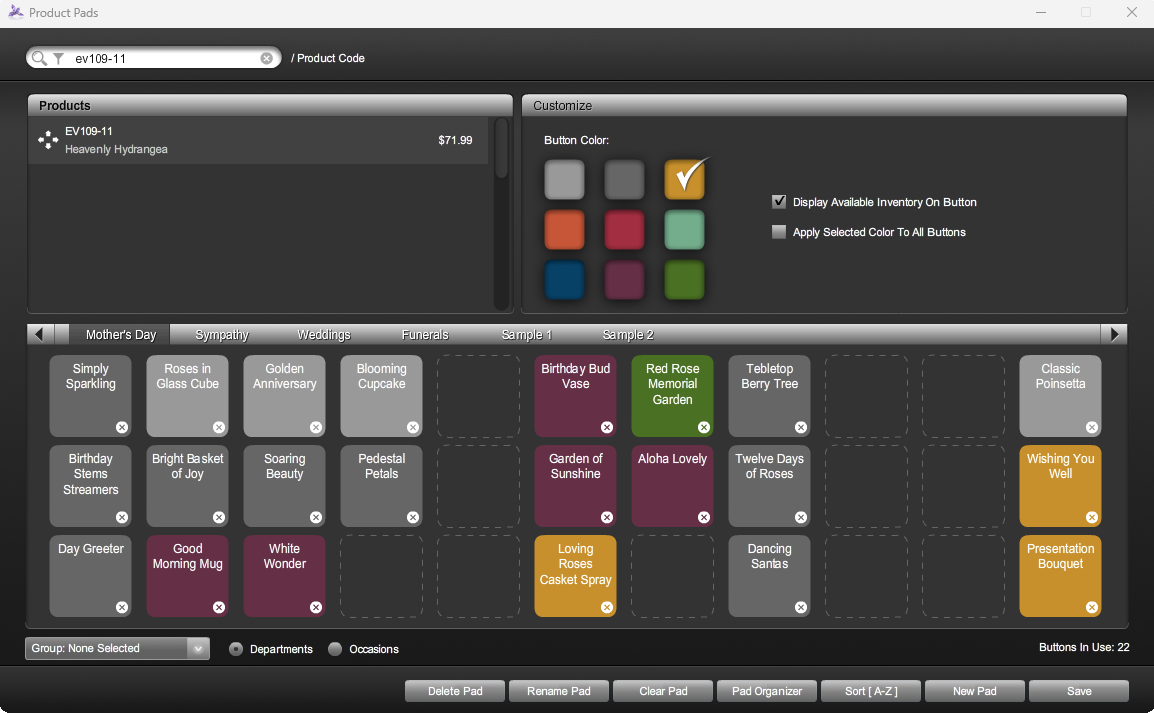
Build an order-entry screen that works the way your flower shop does. The IRIS Product Pad Manager puts you in control of your button layout, colors and product groups—so your team can find the right item, see what’s available and keep each sale moving.

Touchscreen friendly by design. Give your team a clear, tap-friendly product screen that makes everyday order entry feel natural.

IRIS Product Pad Manager with configurable button colors, live inventory display, occasion tabs and alphabetical sorting controls
IRIS Product Pad Manager · View full-size screenshot ↗
  • Arrange buttons with drag & drop. Position your product buttons wherever they work best for your shop’s order-entry flow.
  • Organize with color. Choose from different button colors to make products and categories easier to recognize at a glance.
  • Show live inventory counts. Choose whether available stock appears on each button, helping your team see what’s available in real time while taking customer orders.
  • Create unlimited product tabs. Group buttons by occasion, season or any category—Mother’s Day, Sympathy and more—for quick access.
  • Sort alphabetically in one click. Put product buttons in A–Z order without rearranging each one by hand.
  • Put your pad groups in the right order. Use drag-and-drop controls to arrange product pad groups any way you wish.
  • Make the most of touchscreens. Customize a tap-friendly layout that keeps your products organized and close at hand.
VISUAL MODE

See the arrangement.
Make the sale.

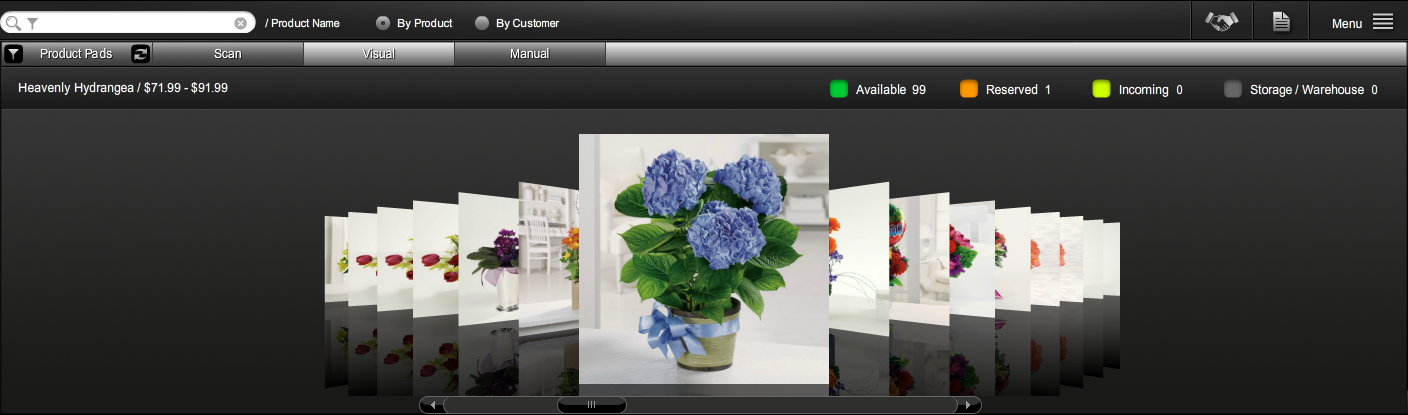
Looking for another way to take orders? Meet IRIS Visual Mode. Bring your products into a photo-led view, find the right arrangement with advanced search and add it to a sale with a click or tap.

From helping a website shopper over the phone to inspiring a customer at your counter, Visual Mode puts the photos and inventory details you need close at hand—so you can answer questions, guide their choice and keep checkout moving.

Desktop and touchscreen ready. Browse arrangements and add products with a mouse click or a fingertip, using the setup that works best for your shop.

IRIS Visual Mode with arrangement photos, product search and available, reserved, incoming and storage inventory indicators
IRIS Visual Mode · View full-size screenshot ↗
  • Find the right photo faster. Search by product name, code, description, category and more to bring up the arrangements you need.
  • Turn a photo into an order. Click or tap an arrangement’s photo to add that product directly to the sale.
  • Help website shoppers while you talk. Pull up the arrangement your phone customer is viewing online, answer questions in the moment and move their order forward without scouring your website.
  • Inspire customers at the counter. Display photos of past arrangements to help shoppers choose a design that feels right for their occasion.
  • See the full inventory picture. Check what’s available, reserved, incoming or in storage/warehouse stock when you need a closer look.
  • Work comfortably with a click or tap. Visual Mode is designed for desktop computers and touchscreen monitors alike.
BARCODE SCANNING · SCAN MODE

Scan the code.
Keep the line moving.

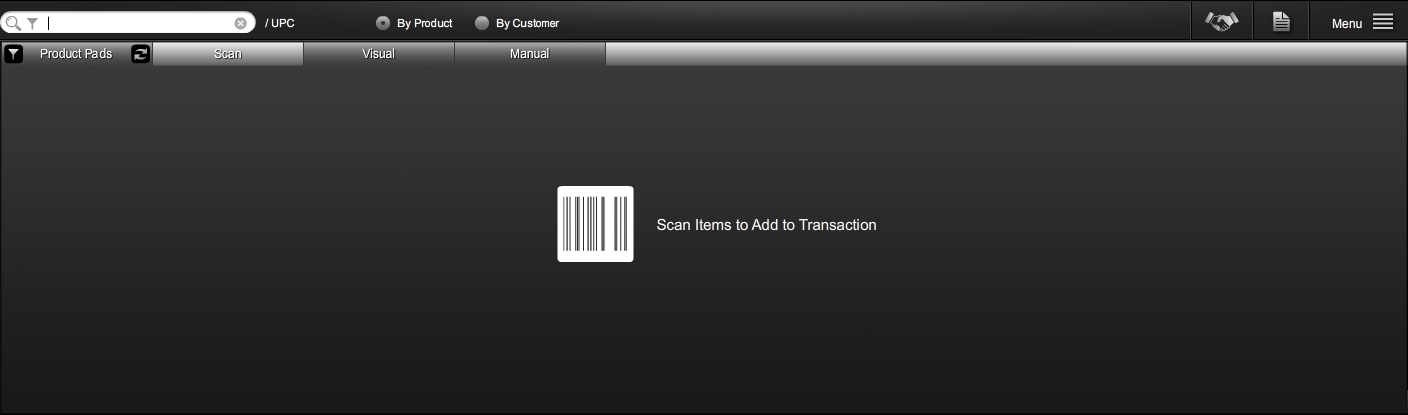
Need a quicker way to add products at the counter? IRIS Scan Mode lets your team scan UPC barcodes or product codes/IDs to add items to an order without hunting through product lists.

When Valentine’s Day orders are pouring in and customers are lining up, switch to Scan Mode. Give your team a straightforward way to handle barcode-ready products and keep checkout flowing through your busiest moments.

Built for busy flower shops. Spend less time on manual product entry and more time helping the next customer.

IRIS Scan Mode order-entry screen with UPC search and barcode scanning to add items to a transaction
IRIS Scan Mode · View full-size screenshot ↗
  • Scan UPCs or product codes. Use UPC barcodes or your product code/ID to identify items and add them to the order.
  • Use your choice of scanner. IRIS is compatible with any barcode scanner on the market, giving your shop flexibility in its checkout setup.
  • Cut down on manual product entry. Scan barcode-ready items instead of searching for each product by hand.
  • Handle the holiday rush. Switch to Scan Mode when the counter gets busy to help keep your checkout line moving.
MANUAL MODE

Their vision.
Your personal touch.

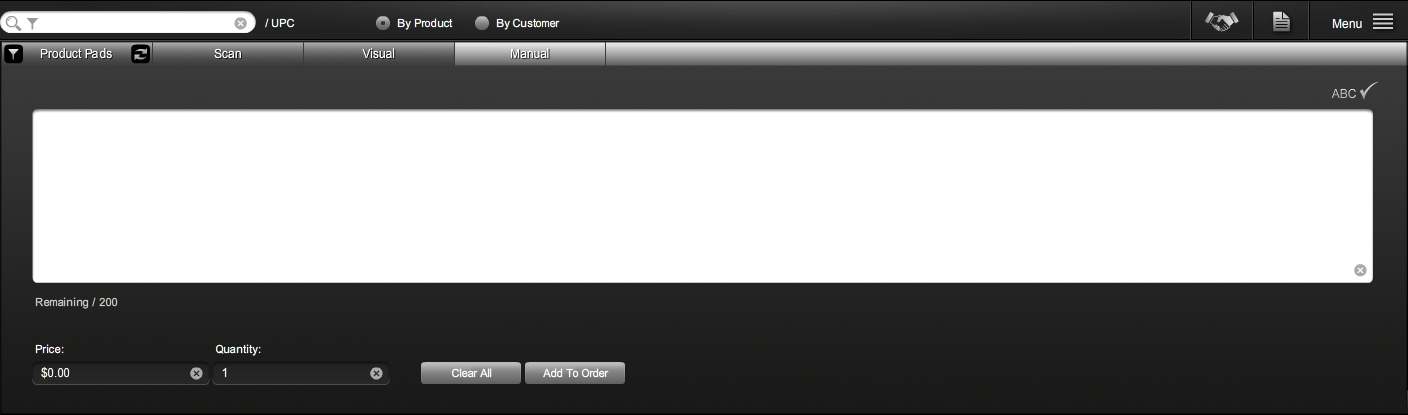
Some floral orders deserve more than a standard product selection. With IRIS Manual Mode, you can bypass traditional product-entry options and write a custom description that reflects your customer’s preferences.

When a customer has a particular vision, capture the details that matter and give your design team clearer instructions. Turn a more thoughtful order-taking experience into the personalized service that helps your flower shop stand out.

Personal service. Clear instructions. Give your customers room to explain what they have in mind, then carry those requests into the order for your design team.

IRIS Manual Mode with a custom order-description field, price and quantity controls, and an Add To Order button
IRIS Manual Mode · View full-size screenshot ↗
  • Go beyond standard product choices. Switch to Manual Mode when a customer’s request calls for a custom description rather than a traditional product selection.
  • Capture their preferences. Enter the details your customer wants included while you take the order.
  • Give your design team a clearer brief. Keep the customer’s requests in the order description so your team understands the vision behind it.
  • Make personalized service your difference. Bring a more attentive approach to orders that need extra care and help customers feel heard.
YOUR POS MAIN MENU

Your shop’s essentials.
One menu away.

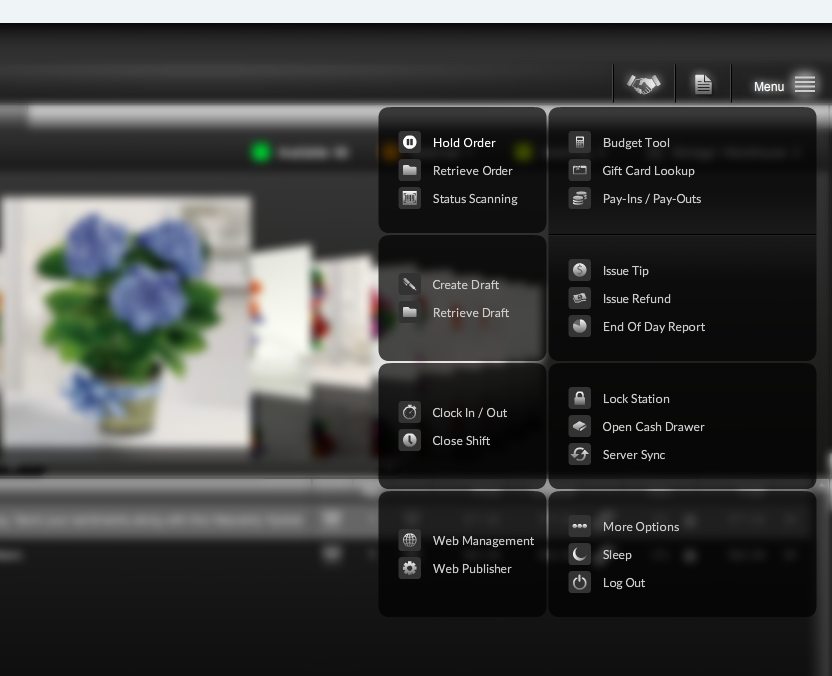
Still looking for more of the core tools every flower shop needs? The IRIS florist POS main menu keeps everyday tasks close at hand. Open it at any point during an order to hold or retrieve a sale, look up a gift card, access budgeting tools and more.

From managing shifts and issuing tips to handling refunds and reviewing your end-of-day report, give your team a straightforward way to reach the tools that help keep your flower shop moving.

Popular orders. Less repeated entry. Create reusable order drafts for frequently requested combinations, then load a saved template with one click when you need it.

IRIS florist POS main menu with order hold and retrieval, draft templates, gift card lookup, budgeting, shift, refund and cash-management tools
IRIS POS Main Menu · View full-size screenshot ↗
  • Hold an order. Pick it up again. Use Hold Order and Retrieve Order when you need to pause an order and return to it later.
  • Keep order-status tools within reach. Open Status Scanning directly from the main menu.
  • Reach your budget and gift card tools. Access the Budget Tool or use Gift Card Lookup while working in your POS.
  • Manage shifts, tips and refunds. Clock in or out, close a shift, issue a tip or issue a refund using the corresponding menu options.
  • Access everyday cash controls. Open Pay-Ins / Pay-Outs, the cash drawer and your End Of Day Report from the same menu.
  • Save your frequently placed orders. Use Create Draft to build a reusable order template and Retrieve Draft to bring it back with one click.
  • Find your website tools. Access Web Management and Web Publisher directly from the POS main menu.
  • Keep station controls close by. Reach Lock Station, Server Sync, More Options, Sleep and Log Out without hunting through separate menus.
BUILT FOR YOUR HOLIDAY RUSH

A familiar Valentine’s Day order.
Ready to use again.

One dozen roses. A teddy bear. A box of chocolates.

If your shop sells that combination again and again, build it once as an IRIS order draft. When the next customer asks for it, retrieve the saved template with one click, review the order details and keep the sale moving.

Spend less time entering the same products and more time helping the customer in front of you—especially when your holiday checkout line is growing.

DELIVERIES, PICK-UPS & WIRE ORDERS05 / EVERY ORDER, ONE SCREEN

Deliveries, Pick-ups & Wire Orders...Oh My.

One screen. Every detail that matters.

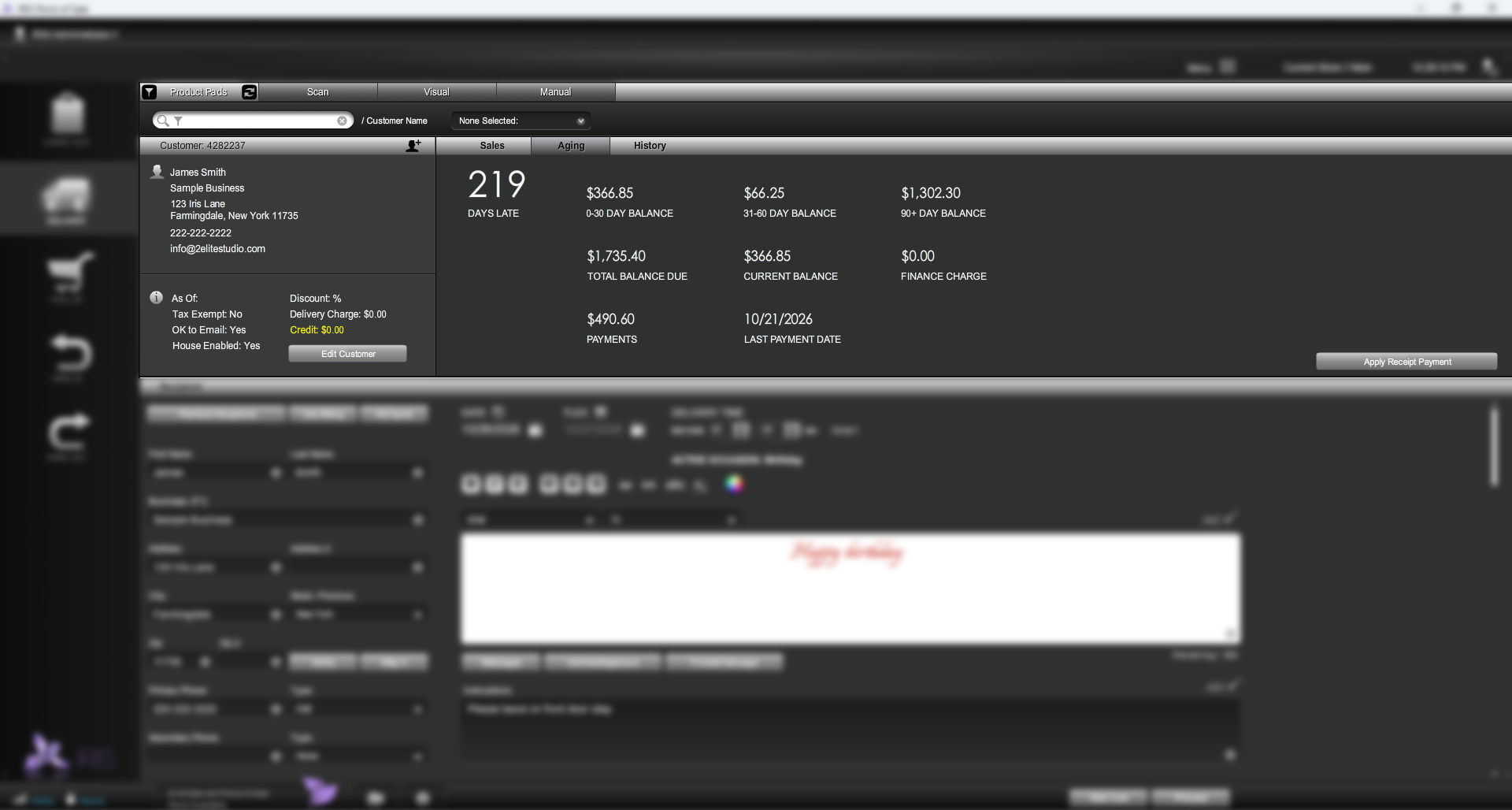
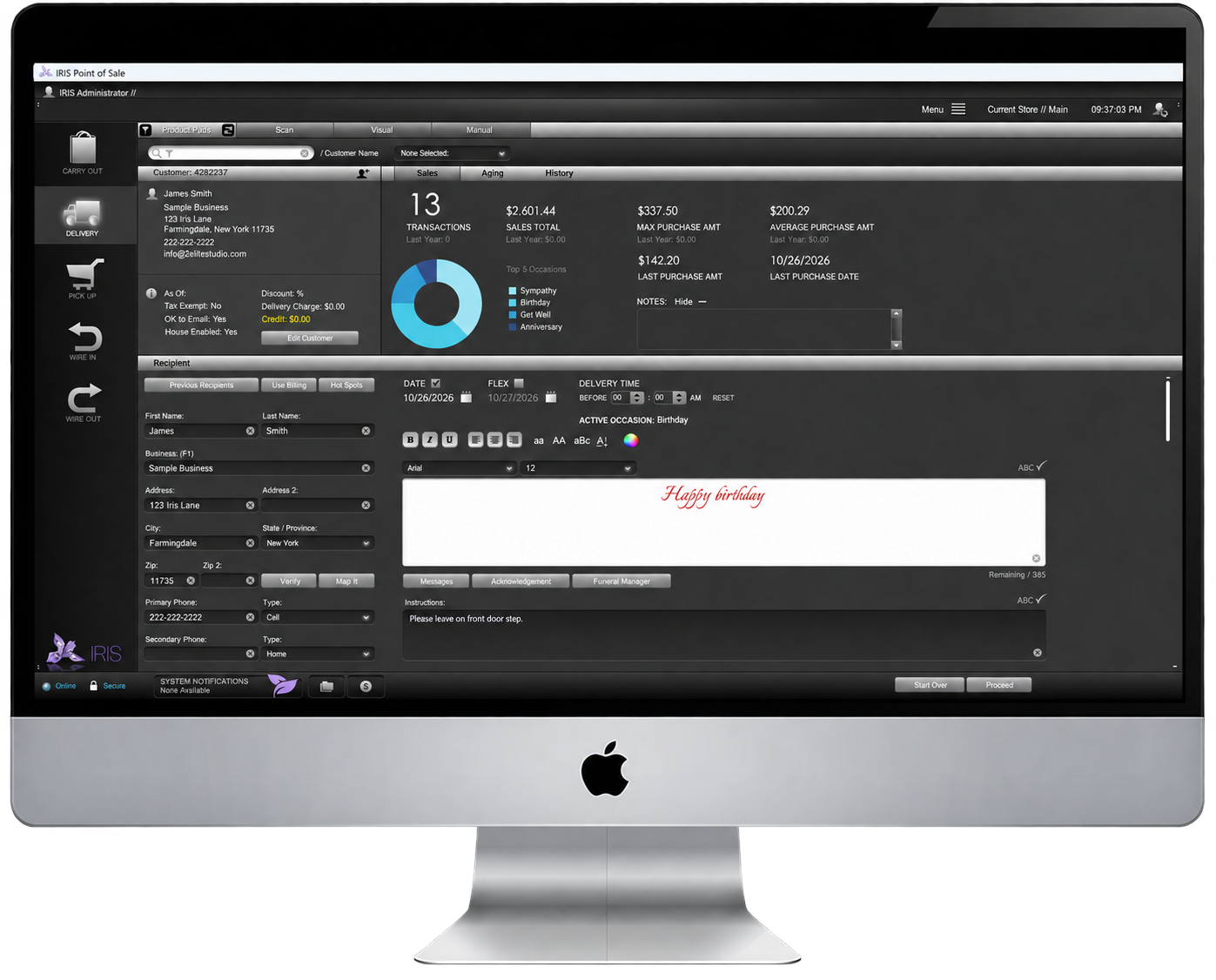
From a quick pick-up to a carefully planned delivery, give every order the attention it deserves. IRIS brings your customer details, card messages, delivery tools and wire orders together in one florist-friendly workflow.

Build the order, personalize the message and manage the delivery details—all with the tools your flower shop needs right at your fingertips.

START YOUR FREE TRIAL
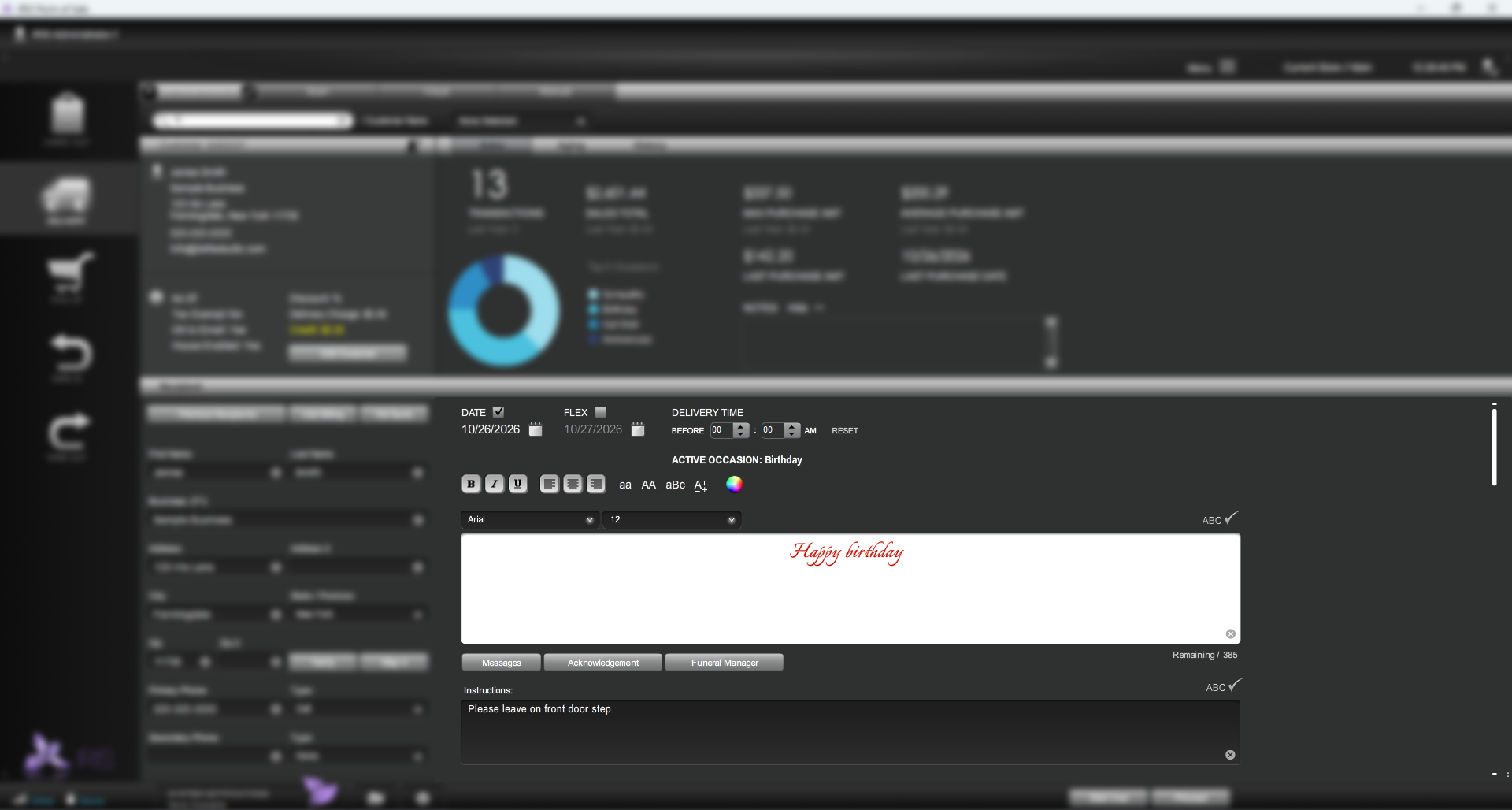
IRIS florist POS delivery-order screen with customer, recipient, card message and delivery details
IRIS Delivery, Pick-up & Wire Order Entry
MORE AT YOUR FINGERTIPS

More options.
Same screen.

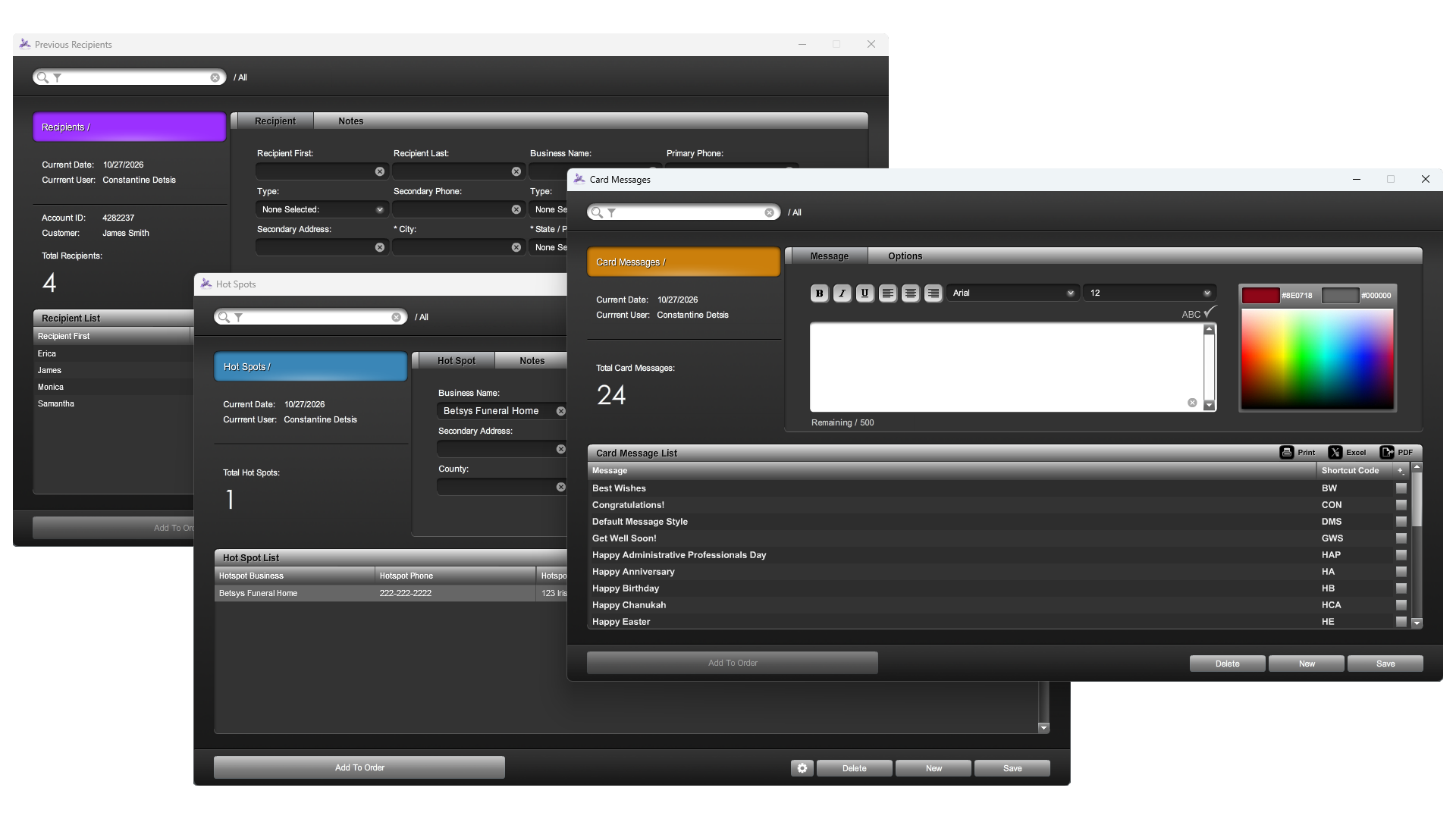
We’ve only scratched the surface. IRIS puts your recipient lists, frequent locations and card-message tools right where you’re taking the order. Choose what you need and add it to the sale with one click.

IRIS florist POS montage showing the previous-recipient list, Hot Spots controller and Card Message controller available during order entry
IRIS order entry · Three more ways to stay in control.View full-size montage

Past recipients.

Open your customer’s full previous-recipient list and bring familiar recipient details into the current order.

Hot Spots.

Access your frequent delivery locations in the Hot Spots controller and add the location details you need.

Card messages.

Choose from pre-loaded messages or edit the wording in the Card Message controller while the order is underway.

Keep your lists current.

Add, remove or update recipients, hot-spots and card messages in real time during the sale—without navigating to another screen. Your databases stay under your control while you work.

MORE BUILT INTO EVERY ORDER

Hidden gems. Everyday control.

MULTI-STORE ORDER TRANSFERS

Take the order.
Choose the store.

More than one flower shop? Give each order a clear handoff. Choose the receiving store from the menu at the top of your order-entry screen. When you complete the sale, IRIS transfers the order in real time and places it in that shop’s Order Manager.

Explore multi-store transfers & alerts

Keep the right people in the loop.

The receiving shop can be alerted when the transferred order arrives. Configure text messages and emails for store administrators, managers or any other account level, keeping the people you choose informed.

Bring incoming transfers into focus.

Enable on-screen notifications with sound alerts so the receiving team has another way to notice an incoming order.

Have the right paperwork ready.

Configure automatic printing based on order type, including delivery/super tickets, pick-up tickets, designer worksheets and more. Help the receiving team move from a transferred order to the next step with the documents it uses.

IRIS florist POS store-location menu for choosing the receiving shop during order entry, with the surrounding interface blurred
IRIS multi-store order transfer · View full-size screenshot
REAL-TIME ADDRESS VERIFICATION

Find the address.
Fine-tune the search.

Better delivery details start with a clearer address. IRIS uses real-time lookups from multiple address APIs to automatically correct spelling and formatting—supporting the distance calculations and delivery fees you apply to the order.

Explore address verification & search settings

Keep destination details consistent.

Look up addresses as you enter the order and give your team a more consistent starting point for distance and delivery-charge calculations. Address verification helps tidy the details behind your shop’s delivery workflow.

Search nationwide. Or stay local.

Configure your address-search parameters in the IRIS backend. Search the entire United States or focus on your local area, depending on how your flower shop handles deliveries.

Your search radius. Your choice.

Specify a search radius in miles to tailor your address lookups. Keep the search settings aligned with your business, rather than relying on a one-size-fits-all search area.

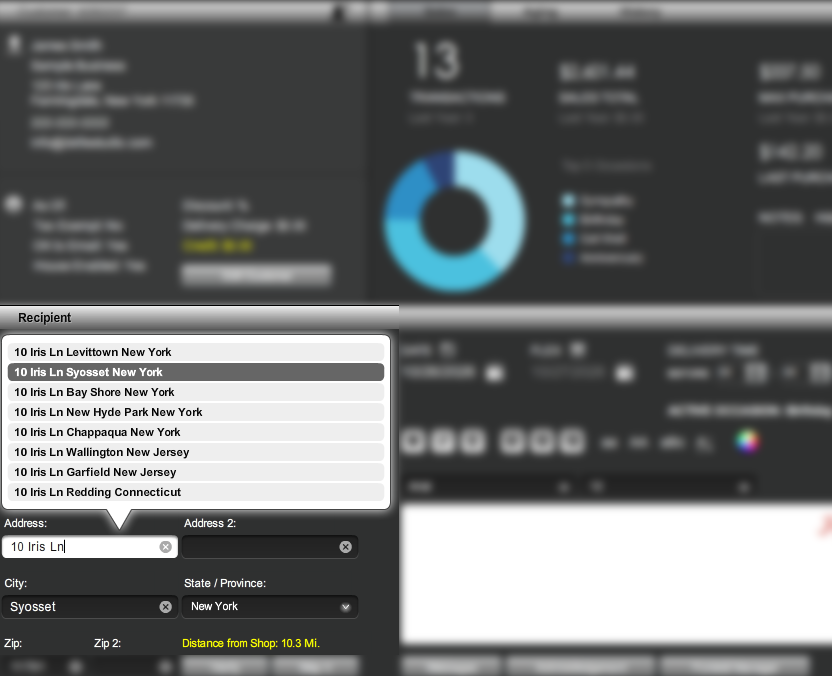
IRIS florist POS real-time address lookup showing suggested recipient addresses and distance from the shop, with the surrounding interface blurred
IRIS real-time address verification · View full-size screenshot
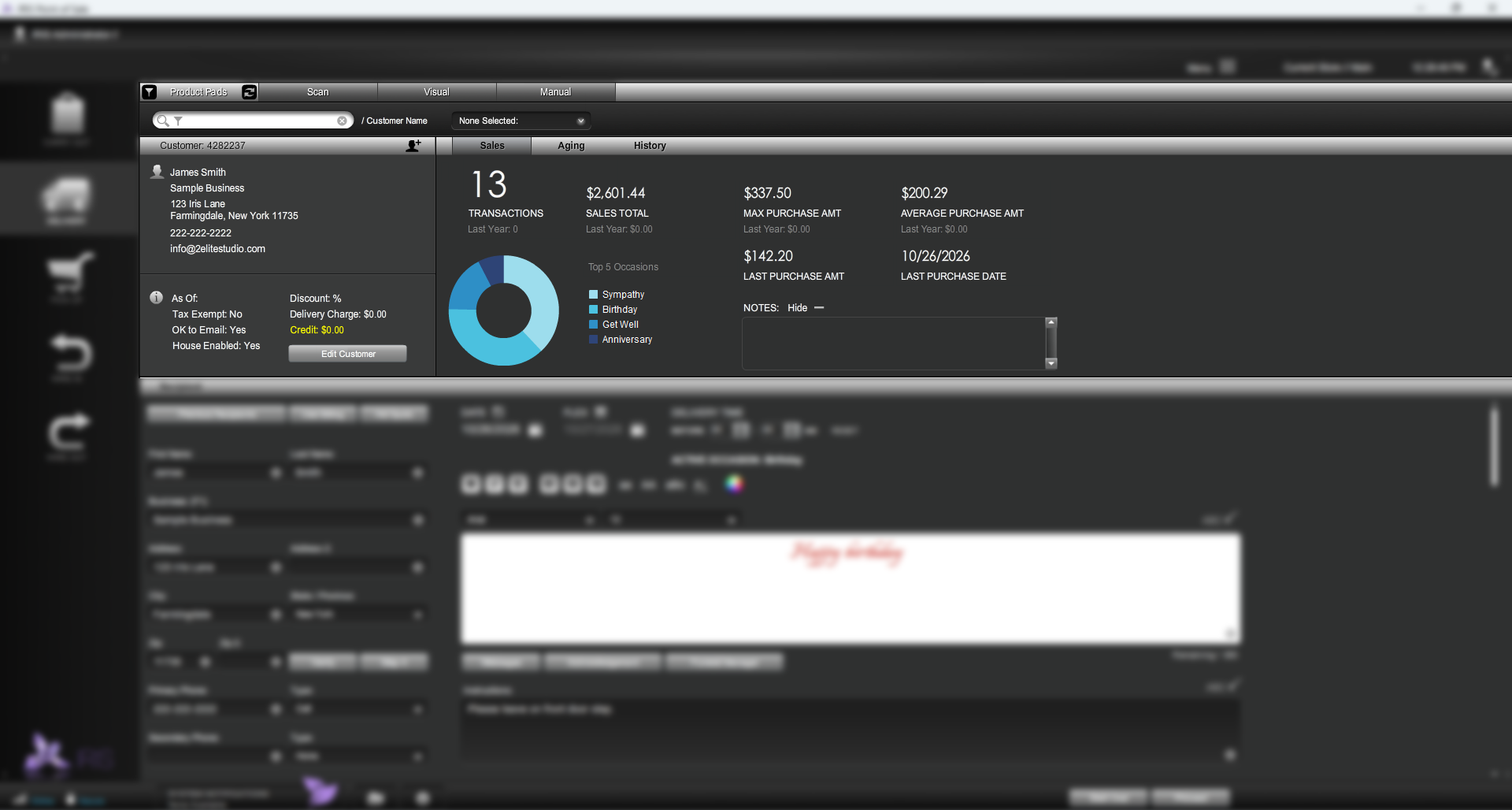
  • Search or add new customers to an order.
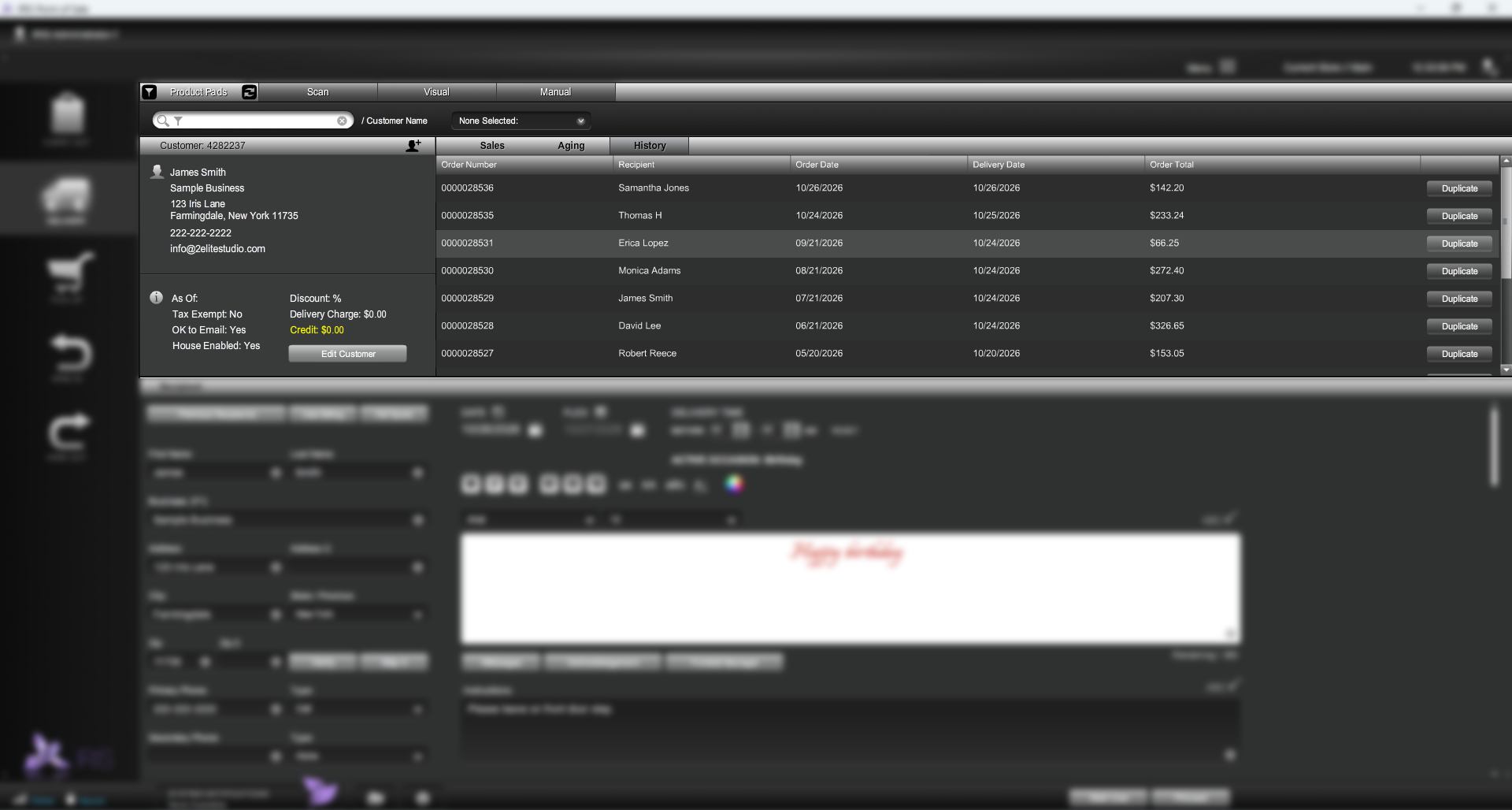
  • View customer order history at a glance.
  • View sales statistics, open balances, sales averages & more while taking an order.
  • Process a separate payment on account during a sale in progress.
  • Duplicate an entire order with one click or choose specific products from a past transaction.
  • View a customer's past recipients and add them to an order with one click.
  • Use the 'Hot Spots Module' to save your frequent locations like hospitals & funeral homes.
  • Track your funeral orders with our built-in funeral manager.
  • Easily add & style card messages w/ our card message suite. ( Supports acronyms and keyboard shortcuts )
  • Integrated address verification. Find & verify recipient addresses while typing.
  • Real-time mapping. View destinations on a map while taking a delivery.
  • Distance display. IRIS will show you the distance from your shop to a recipient's location.
  • Enter delivery dates, time & instructions for your orders.
  • Advanced delivery charge management. Set up your delivery charges by zip code, distance, customer profile, recipient, hot spot, funeral home, fixed rate & more.
  • Tax by destination feature. IRIS offers real time, automatic tax lookups based on where a delivery is going.

Print the way your flower shop works.

IRIS supports industry-standard delivery and superticket layouts, including Dove, Eagle, FTD and RTI, plus designer worksheets and enclosure cards. Print pick-up, wire-in and wire-out tickets, too. Use John Henry print stock or plain paper—whichever suits your shop.

Built for busy days.Explore offline POS ↗

IRIS's hybrid design automatically switches to offline mode if your internet connection drops, so core POS tasks can continue. Some connected features still need internet access.

Oh, IRIS Works Offline Too.
No Internet. No Problem.

Don't panick if you lose your Internet connection on Valentine's Day.

IRIS is still 60% usable so you don't have to turn away business.

( Like with a lot of those other floral POS systems )

YOUR IRIS. YOUR WAY.04 / TWO FLAVORS

By the way, did You Know IRIS Comes In Two Flavors?

You can change the theme of IRIS Floral POS at any time.

Choose what's best for your eyes...and mood.

Go Dark w/ IRIS Midnight

I'm feeling pretty cool.

Floral POS Dark

Go Light w/ IRIS Pearl

It's dark, turn on the lights.

Floral POS Light
THE DETAILS THAT MAKE THE DIFFERENCE

A better way to work.

Order entry, your way

Create Product Pads for your bestsellers, holidays, and occasions. Choose your buttons, colors, and layout.

The details matter

Keep card messages, recipient addresses, delivery instructions, and customer history together with each order.

Stay in control

Manage inventory, print delivery tickets and statements, and support multiple stores from your floral POS.

A FEW HELPFUL ANSWERS

Let’s make this
feel simple.

We’ll help you choose the right tools for the way your shop works.

Ask our team ↗
Can you help me switch from my current POS?

Yes. Our team helps import your existing data and provides training so you and your staff can settle into IRIS. Contact us to talk through your current system and the data you need to bring across.

Does IRIS work without an internet connection?

IRIS floral POS has an offline mode for core tasks when your connection drops. Some connected functions still require internet access; our team can explain which features remain available for your setup.

Do I have to sign a long-term contract?

No. IRIS offers a pay-as-you-go approach without a long-term contract. Talk with our team about the products and plan that fit your shop.

What is included with the free trial?

Your current IRIS offer is a 14-day trial with no credit card or contract required. Contact our team to arrange your trial and confirm the right products for your business.

Is training and support included?

Yes. Training and support are included in your monthly plan, with a dedicated representative who gets to know your business. Reach our in-house team at 877.810.4747.

Will IRIS run on PC & Mac?

Yes. IRIS runs on both PC and Mac operating systems, with no drive partitioning or virtualization software required—simply install it and get started.

Will IRIS work with my existing hardware?

You are not required to use IRIS-recommended hardware, although it is advised. IRIS is designed for high-quality printers, scanners, card readers, and other commonly used retail peripherals; most hardware will usually work, but perfect operation with every device cannot be guaranteed.

Do I have to use one of your recommended credit card processors?

No. You can keep your existing credit card processor, though IRIS-preferred processors offer certain integration advantages.

Is IRIS EMV compliant?

Yes. IRIS is fully certified EMV compliant and can suggest compatible chip-card terminals for your setup.

Are there any hidden fees for your service?

No. Your monthly fee covers your IRIS service, with no hidden service fees or charges.

How long does it take to set up a merchant account?

Underwriting can usually provision a merchant account within 24–48 hours, provided all required information is complete. Timing is typical and remains subject to underwriting approval.

I have an existing website. Can IRIS integrate with it?

IRIS integrates with Shopify, WooCommerce, BigCommerce, 3dCart, and Flower Shop Network, and also offers a built-in shopping cart for existing websites. Contact us to discuss the setup that best matches your site.

Can I send & receive orders through IRIS?

Yes. Through its Flower Shop Network integration, IRIS lets you send and receive orders directly from the IRIS floral POS.

Can I print delivery / supertickets from IRIS?

Yes. IRIS supports industry-standard delivery and superticket layouts, including Teleflora Dove, Eagle, FTD, and RTI.

Do I have to back up my own data?

No. IRIS manages your backups, with data on IRIS servers protected by multiple layers of encryption, nightly backups, and 15-minute incremental backups. Data is also replicated to a secondary secure location to support recovery.

YOUR NEXT CHAPTER STARTS HERE

Let your business bloom.

Let’s find the right tools for your flower shop. We’ll help with the rest.

Try IRIS free 14 days free. No credit card. No contracts.